
A startup builds a prototype, tests it, learns from it, and changes it. A technician trims one surface. An engineer adds a spacer. A supplier substitutes a radius. A founder asks whether the prototype can be sent to a manufacturer. The team opens the CAD model and realizes the digital file no longer represents the physical product that actually works. The development speed created a gap between what was designed and what was learned.
3D laser scanning can close that gap by turning the physical state back into controlled digital information. The value is not simply faster measurement. The value is faster learning without losing traceability.
Key Takeaway
Startups use scanning to move physical learning back into CAD, supplier packages, verification reports, and controlled revisions. The benefit comes from using the right derivative at the right development gate.
The Prototype-to-CAD Feedback Gap
Physical product development is an iterative loop. CAD becomes a prototype. The prototype reveals problems. Testing creates modifications. Supplier realities shape the design. If those changes are not captured, the team may continue designing from outdated geometry.
This gap creates several forms of friction: repeated manual measurement, supplier confusion, mismatch between test article and CAD, difficulty packaging around purchased components, and uncertainty about whether a pilot part matches design intent.
Scanning gives the team a measured snapshot of the physical configuration. That snapshot can remain measurement evidence, become a mesh, support scan-derived CAD, feed a drawing package, or generate a deviation report. The right output depends on the next development gate.
Where Scanning Removes Product Development Friction
Capturing physical iteration
Many prototype changes are made directly on the object. This is especially common with enclosures, ergonomic surfaces, brackets, fixtures, nests, and assemblies that are adjusted during testing. Scanning preserves that physical learning before the next revision begins.
Designing around purchased or legacy hardware
Startups often integrate motors, batteries, sensors, electronics, seats, mounts, medical components, or legacy parts that arrive with incomplete CAD. A scan can establish an external envelope and critical interfaces when visible and accessible.
Translating organic geometry into engineering data
Hand-shaped surfaces, clay/foam models, composites, castings, molded forms, and ergonomic features often cannot be recreated efficiently from manual measurements. A mesh can preserve measured form; reverse modeling can rebuild selected areas as controlled CAD.
Verifying pilot production
When nominal CAD exists, scanning can compare pilot parts to the intended design. A deviation map can show trends across the whole surface, but it should identify alignment method, tolerance band, exclusions, and whether the result supports engineering review or formal inspection.
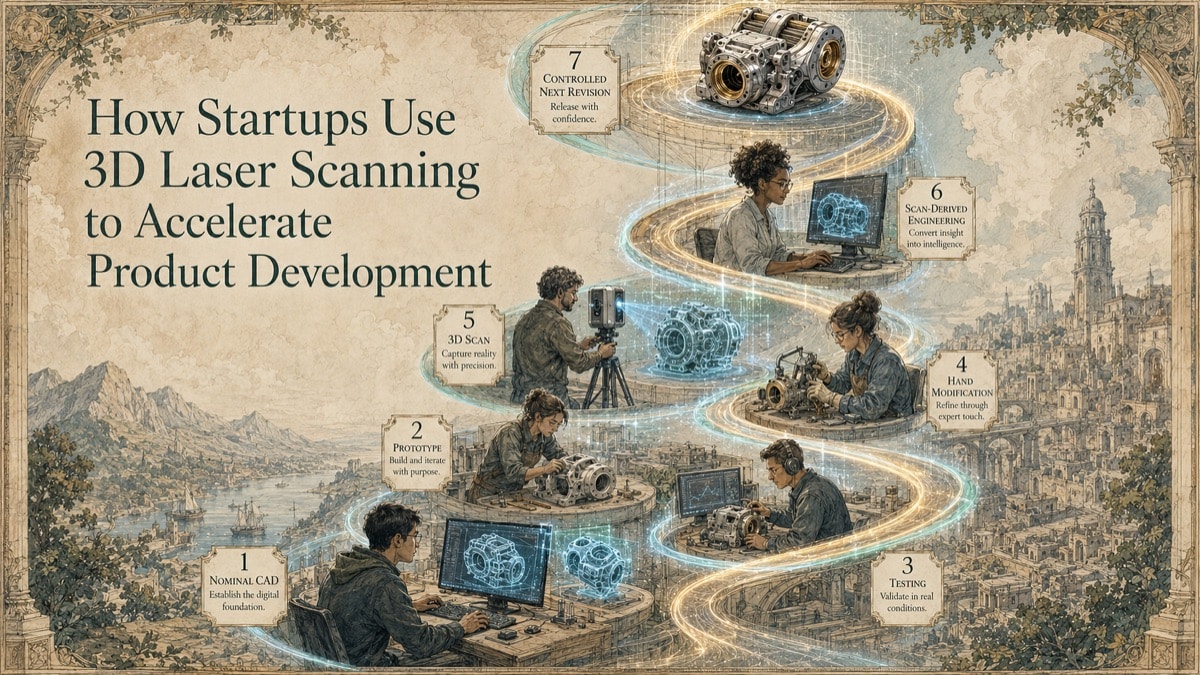
The Seven-Stage Physical-to-Digital Product Loop
Stage 1 - Release a testable nominal state
Record the CAD revision, configuration, units, and known design assumptions before building or modifying the physical article.
Stage 2 - Build and test the physical article
Document intentional and unintentional physical modifications during testing, assembly, supplier feedback, and user trials.
Stage 3 - Capture the approved physical configuration
Scan the features that matter to the next decision and preserve enough context to understand interfaces, alignment, and configuration.
Stage 4 - Preserve measurement evidence
Archive point clouds, images, capture notes, coordinate references, and processing information so the team can trace the output back to the physical state.
Stage 5 - Create the required derivative
Produce a mesh, scan-derived CAD, drawings, or comparison report appropriate to the current development gate.
Stage 6 - Resolve differences
Classify differences as design changes, manufacturing variation, assembly condition, measurement limitation, or modeling interpretation.
Stage 7 - Release the next revision
Update the controlled design package and retain traceability between nominal CAD, physical evidence, and scan-derived deliverables.
Development Gates Where Scanning Helps
| Development Gate | Scanning Objective | Typical Output | Release Question |
|---|---|---|---|
| Concept proof | Preserve physical shape and packaging evidence | Mesh or point cloud | Is the idea ready for controlled redesign? |
| Engineering prototype | Capture interfaces and test modifications | Scan-derived CAD and sections | Does the digital model reflect what was tested? |
| Design verification | Compare prototype to nominal | Deviation report | Are differences understood and dispositioned? |
| Pilot production | Evaluate first articles or batch trends | Repeat scans and comparison reports | Is variation acceptable for the next stage? |
| Supplier transfer | Communicate controlled geometry | CAD and drawings | Can the supplier build and verify the release? |
Table accessibility note: Each row identifies the development gate, scanning objective, typical output, and the decision supported by that output.
Speed Without Losing Configuration Control
Scanning can accelerate product development, but only if the team protects configuration control. The measured object, old CAD, scan-derived model, released CAD, and supplier drawing may all be different. The file package should state which source is authoritative and what each file is intended to support.
A practical startup workflow uses tiered fidelity. Not every surface needs full reconstruction. Concentrate effort on features that affect fit, function, testing, supplier communication, or verification. Preserve the point cloud and processing history so future derivatives can be created when the original capture supports them.
The safest speed comes from staged review. Approve one representative output before processing a batch or building a full supplier package. Confirm orientation, naming, units, feature treatment, drawing expectations, and tolerance approach early.
How GDS Supports Startup Product Teams
GDS can help identify the development gate, capture the physical article, preserve measurement evidence, create authorized derivatives, and document limitations. Depending on the project, that may include point clouds, meshes, scan-derived CAD, STEP/IGES exchange geometry, STL/OBJ, DXF/DWG, 2D drawings, or scan-to-nominal comparison reporting.
The goal is not to add process for its own sake. The goal is to help the team move faster without turning prototype knowledge into uncontrolled geometry.
Quick Facts
Continue Reading
The next best article depends on where you are in the project. These suggested reads connect this topic to the next practical decision your team is likely to face.
Frequently Asked Questions
At what stage should a startup scan a prototype?
Scan when the physical article contains information needed for the next decision and that information is not reliably represented elsewhere.
Can scanning reduce the number of prototype iterations?
It can reduce geometry-driven rework by improving handoffs, but it does not eliminate iterations needed for performance, materials, controls, safety, regulatory, or user testing.
What is the difference between best-fit and datum alignment?
Best fit minimizes overall surface deviation. Datum alignment constrains the comparison to defined references that often represent assembly, inspection, or functional intent.
Can GDS create manufacturing drawings from scan data?
Yes, when drawings are included in scope and the required dimensions, tolerances, design authority, and review process are defined.
What is the main mistake startups make with scanning?
The main mistake is requesting a file format before defining the next decision. The deliverable should follow the use case.
Connect this article to the right GDS workflow
Most physical-to-digital projects touch more than one service. GDS can help determine whether the right starting point is 3D laser scanning, 3D modeling, reverse engineering, or consulting before scope, pricing, schedule, and deliverables are finalized.
GDS supports projects nationwide. Examples from the current locations page include New Orleans, Baton Rouge, Shreveport, and Houston.
Ready to Start?
Tell GDS about your asset, your goals, and your deliverable needs. GDS can scope the right scanning, modeling, and reporting for your project.